

Pre Setup and Installation
This guide assumes that PRIS, BMS, the Dome Connector, and Dome web services are all on the same machine. If these components are on separate machines, then further WCF configuration needs to be done. See:
-
Pre Setup Checklist (Below)
Pre Setup Checklist
Before PRIS can be installed, there are a few prerequisites/preconditions that must be met. What is required will depend on how PRIS is setup, as described in the sections below.
If PRIS is installed on the same machine as an existing Dome, most (if not all) of these prerequisites should already be set.
Ports Required
PRIS needs to communicate with Pitram backend services. For this, several ports need to be open.
| Default PORT | Used by | Default Protocol | Default Security | Security Restrictions |
|---|---|---|---|---|
| 825 | PRIS to BMS | Win BinaryXML / TCP | Windows default client credentials | PRIS and BMS must be on the same domain |
| 826 | PRIS to Dome Connector | Win BinaryXML / TCP | Windows default client credentials | PRIS and Connector must be on the same domain |
| 80 | PRIS to Dome Web | SOAP / http (default) | Windows default client credentials | PRIS and Connector must be on the same domain |
Extra Windows features required
If you are installing PRIS onto a machine that already has Dome (web client), all required features should already be set. Otherwise, you may need set the following:
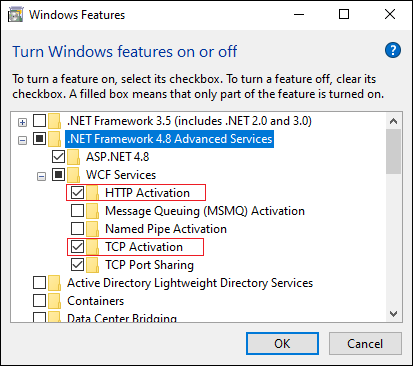
WCF Activation
The server machine must have TCP, and HTTP Activation enabled.
This is enabled via the "Turn Windows features on and off" dialog as shown below:
Run the Installer
This will install PRIS under its own IIS application pool. It should set all required folder permissions. If using token security, PRIS will need full read/write permissions for IIS_IURS to the App_Data folder and PRISDataStore.sqlite, however the installer should take care of this.