Vein Network
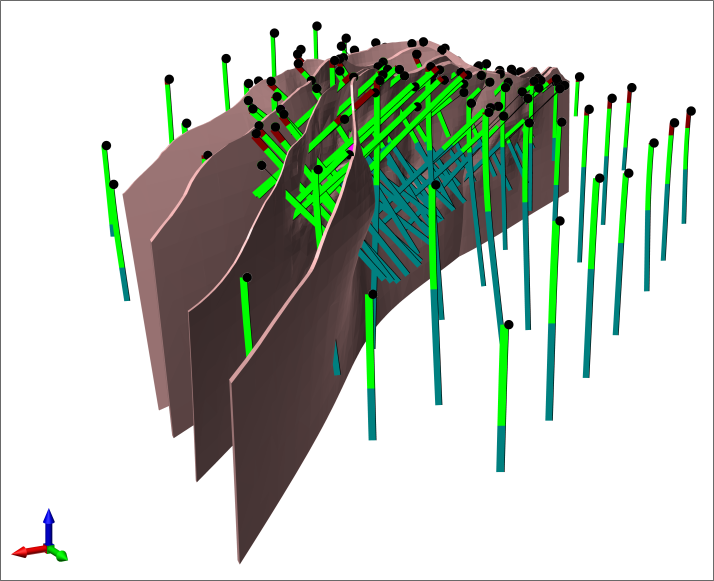
The Vein Network tool allows you to generate a series of vein solids in geological order. Simply define vein interactions and their order and Micromine Origin will produce individually booleaned veins and an entire vein network solid, as well as the complement solid. You are then able to use this output in our Geology Modeller for a more representative model.

If selected, the Generate from Collars option
Input
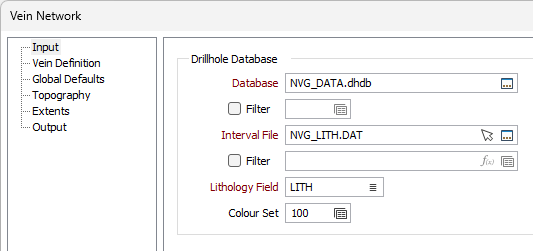
Drillhole Database
Double-click (F3) to select
Optionally, select or create a filter to limit the data that is processed.
If you select the Filter check box, you can select an existing filter or create one using the Expression Editor by clicking the icon.
Interval file
Double-click (F3) to select an Interval file that contains the grades you want to interpolate. You can also click the Pick from Vizex button to collapse the form and interactively select a layer containing the file to be inserted and return to the form. You can optionally apply a Filter to the records in the file.
Lithology Field
Double-click (F3) to select the name of a Character field that contains the lithology codes you want to include or exclude from the interpolation.
Note: For the attributes on the tab, you can select an value using the list button or right-click and select Edit Expression to open the Expression Editor and use an expression. Note also the information in Output Field Name Attributes.
Colour Set
Select the colour set to be applied to the lithology.