

Grade Control
This
 Setup
Setup
Polygon Projection Direction
The Projection Direction option has been added to the Polygons tab of the Grade Control Setup on the Grade Control tab, in the Grade Control group.
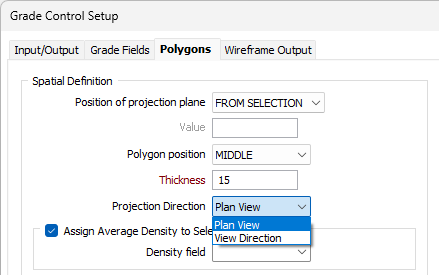
The new option determines the direction in which the polygons are projected into solids. If Plan View is selected, polygons will be projected according to the direction of the plan view. Selecting View Direction will project polygons to the orientation of the Vizex view.
Plan View should be selected when the grade control report has been generated at an oblique angle; as Vizex View may cause anomalies such as stretching and smearing of the solid. Edges which extend beyond the polygon outlines may cause inaccurate grade control reporting. Plan View will default to vertical-only projection.
For more information, see Setup Polygons.