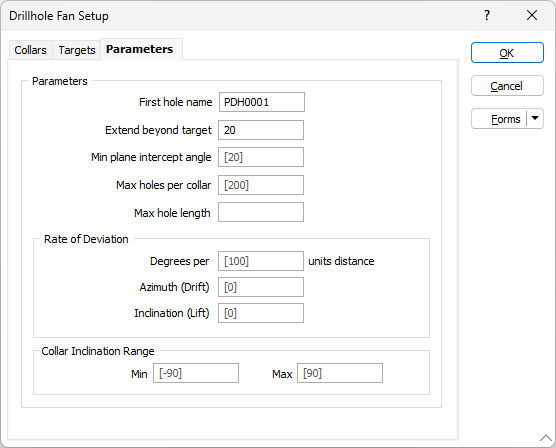
Parameters
On the Parameters tab of the Drillhole Fan Setup form, set the parameters that will be used to constrain the holes that can be generated for each collar.
First hole name
Specify the name of the first hole. The holes generated for the collars listed on the Collars tab of the form are incrementally numbered based on the first hole name.
Extend beyond target
Optionally, specify a distance by which the holes will be extended beyond the target.
Min plane intercept angle
Accept the default value or specify a minimum angle at which a hole may intercept the plane of a surface or solid.
Max holes per collar
For each collar, accept the default or specify the maximum number of holes in a fan.
Max hole length
Optionally, specify a Maximum hole length.
Rate of Deviation
The segments that you add will deviate in their orientation by a specified Azimuth deviation and Inclination deviation, measured in Degrees per units distance. Deviations are defined in terms of the drilling direction.
Degrees per
Enter a value in the field to define the distance to which the rate of deviation applies. The unit of distance, determined by the project settings, is displayed at the right of the field. When left blank, this value will use the Segment length.
Use the rate of deviation options with care. Drillhole deviation is the result of a complex interaction between the drilling parameters (bit type, feed pressure, rotation speed etc.), the cutting or hammering action of the bit, the rocks through which the hole passes, and the angle between the drill bit and the fabric of the country rock. Changing any one of these parameters may result in significantly different rates of deviation compared to other holes.
In a new project area, you should plan for straight holes until you have enough drilling to understand how the prior holes deviated. Even with this knowledge you should always consider any planned deviation to be an approximation of the completed drillhole.
Azimuth (Drift)
Enter the Azimith value which applies to the Drift for the rate of deviation.
Inclination (Lift)
Enter the Inclination value applicable to the Lift for the rate of deviation.
Collar Dip Range
Accept the defaults or specify a dip range for the holes that will be generated from each collar.