

Footer
The Main Footer is positioned at the bottom of each page. It consists of an “empty” frame that extends across the width of the page. The height of the frame is defined in paper units (typically millimetres). Selecting the option to show a Border enables border colour and line thickness prompts.
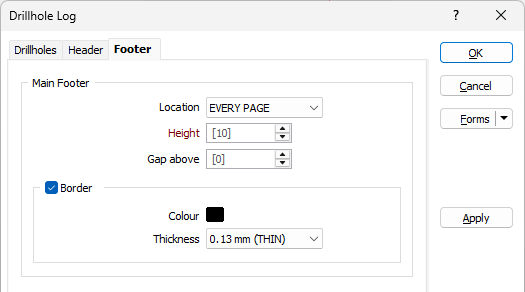
Location
A footer can be displayed for EVERY HOLE, on EVERY PAGE. By default, NONE is selected and no footer will be shown.
Height
Specify the height of the Footer frame, measured in points. The default height for a displayed footer is 10.
When a spin control has focus, you can use the mouse wheel to increase or decrease the displayed value.
Gap above
Optionally specify a gap, measured in points, between the top of the footer and the bottom of the columns displayed in the Log. By default, 0 gap will be applied.
Border
Select the check box to display a border.
Double-click on the icon to set the colour for the frame border. This input is disabled when a NULL fill colour is selected.
Select a line thickness value (in millimetres) for the border of the frame. THIN, MEDIUM, THICK, or a Custom thickness can be selected. This input is disabled when a NULL fill colour is selected.
Column Footers
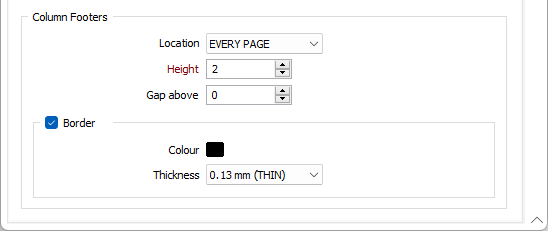
In addition to the Main Footer, you can also display a footer at the bottom of each column.
Location
A footer can be displayed for EVERY HOLE, on EVERY PAGE. By default, NONE is selected and no footer will be shown.
Height
Specify the height of the Footer frame, measured in points. The default height for a displayed footer is 10.
When a spin control has focus, you can use the mouse wheel to increase or decrease the displayed value.
Gap above
Optionally specify a gap, measured in points, between the top of the footer and the bottom of the columns displayed in the Log. By default, 0 gap will be applied.
Border
Select the check box to display a border.
Double-click on the icon to set the colour for the frame border. This input is disabled when a NULL fill colour is selected.
Select a line thickness value (in millimetres) for the border of the frame. THIN, MEDIUM, THICK, or a Custom thickness can be selected. This input is disabled when a NULL fill colour is selected.