

Setup (Dynamic)
 Conceptual
Haulage is one of mining's highest-cost items, and getting the source-to-destination path right is critical to an accurate schedule — get the estimate wrong, and cycle times (and the resulting schedule) are wrong too.
Building vector-driven haulage routes from straight-line haul segments can be tedious and fiddly to redo for every period across the schedule horizon.
Used alongside vector-driven profiles, Dynamic Haulage Rules provide baseline point-to-point path-finding using grids. These rules have a Process Centroid (Step 1), a Destination Centroid (Step 2) and a Dynamic STEP TYPE (Step 3) in-between.
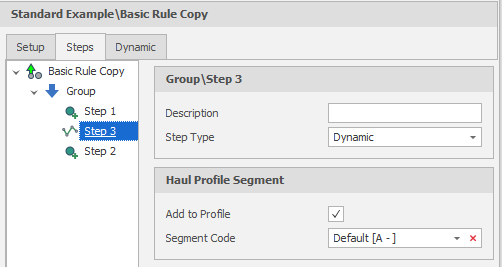
When the Rule Type is Dynamic, the ability to set the Step Type to Dynamic is available:
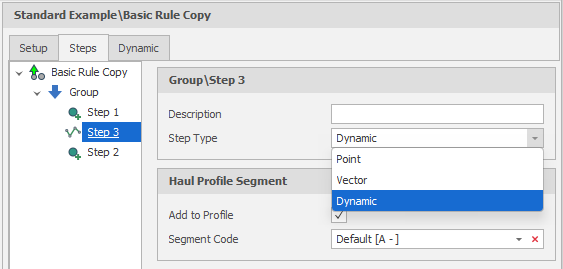
Dynamic (rather than Point or Vector) Step Types allow haulage routes to be created which follow the mine as it changes and which adhere to various constraints, including the use of region polygons and geofence boundaries.
Dynamic Haulage Rules provide:
-
Coverage gap-filling: Using Network Rule as a backup routing method for haulage sections not yet built out with vector profiles, so schedules stay complete even where manual route logic hasn't been set up.
-
Rapid re-routing after mine changes: Recalculating practical haul paths automatically as pit surfaces, topology, or dig progress change, without manually rebuilding vectors each period.
-
Enhancement of existing vector profiles: Using vector profile points as waypoints so that dynamic rules can then fill-in realistic short-path segments between them, rather than relying on straight-line assumptions.
On the Setup tab of the Haulage Rule dialog, when you set the Rule Type to Dynamic, additional parameters are available on a "Dynamic" tab.
The Dynamic haulage rule type leverages dynamic terrain grids. Haulage profile generation dynamically adapts to the schedule state, rule steps, and geographical constraints.
Additional Options, Cut and Fill and Roads and Ramps groups are constraints for the path-finding.
Inputs
Grid Source
The Inputs that are required differ depending on the chosen Grid Source:
-
Generated
-
Reporting Level - Constrain the path based on scheduling period.
-
Grid Spacing - set the spacing of the generated grid.
-
Grid Rotation - optionally apply a rotation to the grid.
-
Region Layers - Use a region polygon to constrain the haulage path to a particular area. The grid is automatically updated to fit within the extents of the polygon and a haulage path is generated within it.
-
Triangulations - Triangulations of the site, for example topography, that can be used to set the extents of the grid.
-
Geofence Layers - Boundaries or regions that cannot be traversed by the path-finding.
Based on these parameters and constraints a preview of the grid is generated over the haulage network layer.
A grid is generated on-the-fly using the following parameters and constraints:
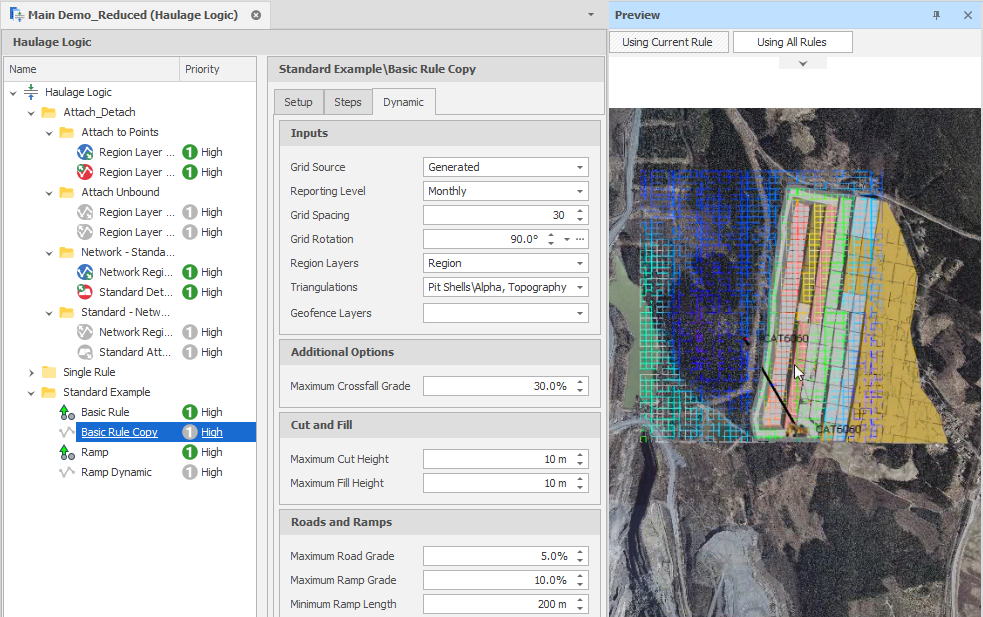
Haulage Rule Setup: Dynamic Rule with generated grid
-
Grids Folder
-
Grid/Grids Folder - Select a folder containing the grid(s).
-
Grid Dates Interpolation - Choose a (Start, Middle, End) interpolation date.
-
Geofence Layers - Boundaries or regions that cannot be traversed by the path-finding.
The selected grids are draped over the haulage network layer and constrained by Geofence layers (if any).
Select the grid(s) that will be used to define the rule:
Additional Options
Maximum Crossfall Grade
Use the spin controls to set the Maximum Crossfall Grade of the haulage path.
Cut and Fill
Use the spin controls to set the Maximum Cut Heights and Maximum Fill Heights for mining.
Roads and Ramps
Use the spin controls to set the Maximum Grade for roads and ramps and set the Minimum Length and Maximum Length of the ramps.
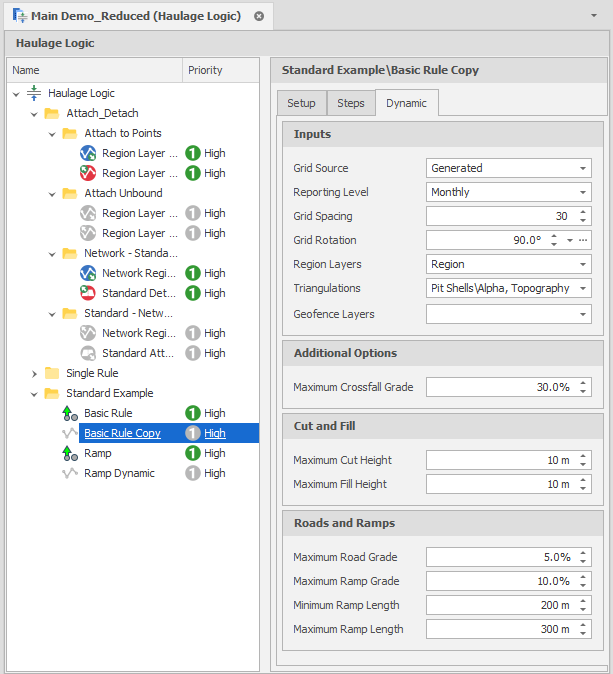
Haulage Rule Setup: Dynamic Rule