

Options
The option to select an Original Data code field is provided on the Options tab and the Code field will be created in the points of the interval file if it does not exist. A colour set can be specified, or a palette can be used to automatically assign colours to the display.
Original Data
The Original Data options for the Recode Selection tool are used to set the Code field and a related colour set for the process.
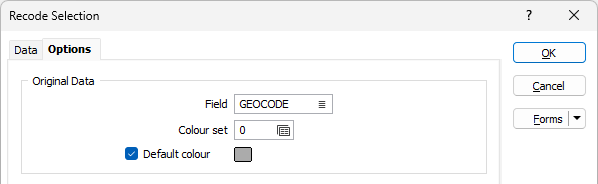
Field
Optionally enter or select the name of the field in the original data to which the reference code values are written. If no field is specified, reference code values in the new codes will be left blank.
Colour Set
Optionally select a colour set to be applied to the display for codes in the original data.
Default colour
Double-click (F3) to select the colour that will be used when a Colour field or a Colour set is not defined - or when a value in the Colour field is either not valid or is not mapped in the Colour set.
New Codes
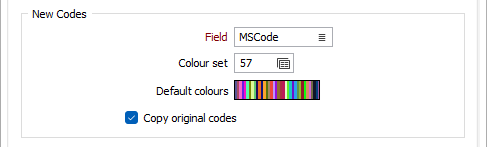
The New Codes options are used to select the code field for the new codes, as well as an optional colour set and a set of default colours for display.
Field
Optionally enter or select the name of the field in the recoded selection where the code values are to be written. This field is required.
Colour Set
To map values in the Colour field to the colour values in a Colour set, double click (F3) to select the set that will be used to control the display colour. Right-click (F4) to create or edit a Colour set.
You can double click the Colour box to set a default colour for the set.
Default colours
Optionally, you can double-click on the colour icons to change the default colours for the new codes.
Copy original codes
Select this option to copy the original code values for the new codes.
Display
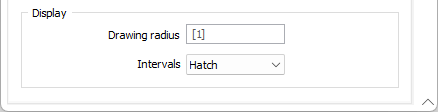
The Display options determine the drawing style and Interval selection for display of the data.
Drawing radius
Enter a Drawing radius to specify the point radius, solid trace radius or hatch half-width display for the selection coding.
Intervals
For drillhole database interval files, you can select whether to display the data in Solid trace or Hatch mode.
OK
When you have configured the Recode Selection as required, click OK to run the process and display the results in the Recode Selection tab. For information on using the Recode Selection to view and select points / intervals, see Using Recode Selection.
Forms
Click the Forms button to select and open a saved form set, or if a form set has been loaded, save the current form set