

Mobile Prestart Configuration
Mobile prestart can be configured to present a particular set of items appropriate for the current equipment unit.
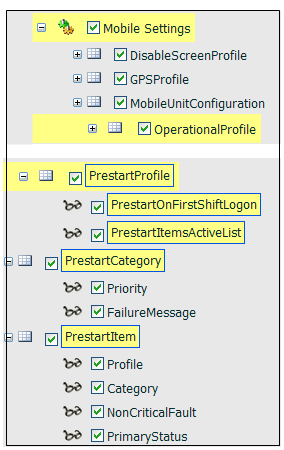
Mobile prestart settings are defined in the following order:
- Prestart Category. The PrestartCategory is defined before the PrestartProfile.
- Prestart Profile. The attribute PrestartItemsActiveList defines the particular active list for this configuration. The active list includes the items that will be displayed on the prestart Mobile screen.
You many need to create an empty PrestartItemsActiveList and add the PrestartItems tokens when they are defined.
Prestart. The attribute Profile defines the appropriate the PrestartProfile that, in turn, defines the appropriate active list. The selected active list includes the items that will be displayed on the prestart screen.
The following Reference Data groups must be deployed before configuring the Mobile prestart:
Active list
When defining an active list for the prestart configuration, the following must be defined:
- Name. Select an appropriate name to identify the active list.
- Category. Select from the list of categories. For example, Equipment.
- Primary Items. It is important the you select PrestartItems from the list.
- Selected Elements. The appropriate list of prestart items.
Select OK to save the new active list.