

Configuring the menu displays
In version 3.9, there has been a change in the way Mobile menus are configured. The menus are still configured through the Main Menu Reference Group
Main Menu Changes
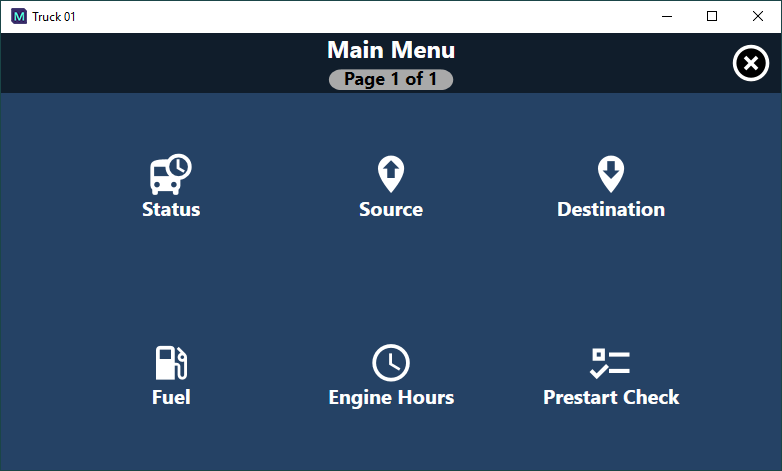
The four menu items shown in the table below can now be defined in the configuration to organize the layout and appearance of the main menu display. If these menu items are defined, this overrides the display sequence set in the menu configuration and results in specially designed icons being displayed instead. To make use of this functionality, the display text for the menu items needs to be set to predefined values. The menu items can also be set to display either a screen or another sub-menu when selected.
| Menu Display Text | Purpose |
|---|---|
| Status | To allow a user to change the primary status of the equipment. Recommendation: set the menu item to display a sub-menu made up of menu items that group the various state groups. |
| Locations | To allow a user to set the location of the equipment. |
| Destination | To allow a user to set the destination of the equipment. |
| Loader | To allow a user to set the loader to which the equipment is allocated. |
In addition, any menu items that are used to submit SMU or summed measures against equipment will also have an appropriate icon.
Property Sheet Interaction
There is now a series of menu items that can be defined in reference data to allow a Mobile operator to invoke a menu that relates to the information being displayed in a specific area of the property sheet. For example, tapping the Destination display results in a menu displaying all available destinations.
To utilize this functionality, the menu items need to have specific display text set, as shown in the table below.
| Menu Display Text | Purpose |
|---|---|
| Status | Displays menu items that allow a user to set the status of the equipment. |
| Loader | Displays menu items that allow a user to set the loader the equipment is allocated against. |
| Destination | Displays menu items that allow a user to set the destination of the equipment. |
| CycleStatus | Displays menu items that allow a user to set the cycle status of the equipment. |
| CutDepth | Displays menu items that allow a user to set the cut depth of the equipment. |
| ZoneID | Displays menu items that allow a user to set the ZoneID of the equipment. |
| Locations | Displays menu items that allow a user to set the location of the equipment. |
If the necessary menu items are not configured, then nothing will be displayed if the operator taps that area of the property sheet.