

Dispatch Configuration
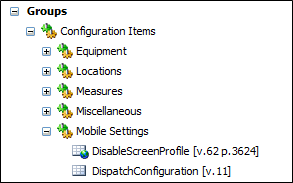
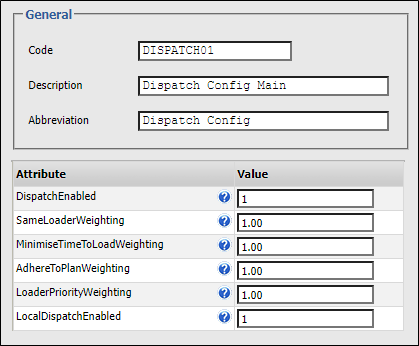
The weightings that are applied to the inputs of the Dispatch system, and the manner in which Dispatch is enabled (if at all), are configured via a Dispatch Configuration reference group in Reference Edit.
Dispatch Enabled
There are three modes of operation for the Dispatch system. Each is specified using a DispatchEnabled numeric code.
You can overwrite these weightings with variable values when running a shift plan simulation.
1 - Enabled
If Dispatch is enabled in reference data, all allocations are calculated automatically directly through Dispatch without operator intervention and applied to the Data Acquisition screen and mobile devices.
0 - Recommendation
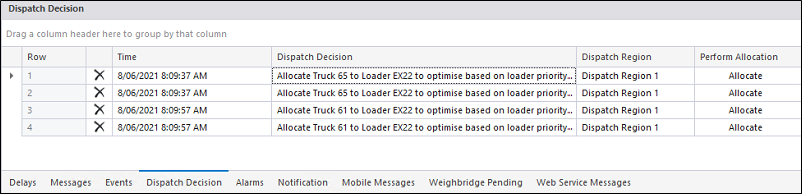
If Dispatch is run in Recommendation mode, the same allocation decisions are automatically generated; however, an operator has up to five minutes to review and manually action them via the Dispatch Decisions panel. After five minutes, the decisions will no longer be displayed in the panel.
Weightings
Same Loader
Apply a weighting which signifies the importance or desirability of keeping a truck on the same loader.
This is particularly useful if you have a trainee operating a particular truck, or there are certain units of equipment you want to exclude from the dispatch process.
Minimise Time to Load
Enter a weighting which signifies the importance of minimising the amount of time a truck must wait before it is loaded.
Adhere To Plan
Enter a weighting which signifies the importance of adhering to the loader allocations in the shift plan.
Loader Priority
Enter a weighting which signifies the importance of the priorities assigned to loaders in Data Acquisition.
Once priorities have been set, and weightings configured for an equipment fleet or a particular unit of equipment, a score is calculated which can be used to determine which trucks will be allocated to which loaders.