

Automatic status change required: Whenever a production drill, for example, reports the final measure, its status is to change to Tramming (Tramming to the next location).
Reference data groupinvolved: EntryOfMeasureAgainstEquipER When the final measure is entered against a unit of equipment, its status changes. All measures are accumulated.
Status Selection Mode: Automatic - Prompt
Procedure
- Define an equipment measure automatic status change in Reference Edit.
- In Data Acquisition, enter measures for equipment to see how the StatusSelectionMode = Automatic - Prompt automatic status change is implemented.
For example, an automatic status change may be implemented when:
- Development drill, PDXX, has finished drilling at the current location. This will be identified by the drill operator reporting the final measure. The measure reported is Production Metres = 70mm.
- The status of PDXX is changed to Tramming. PDXX has finished at the current location and is en route to a new location.
- PDXX calls in intermediate measures. The Control Room Operator has the option to accept the status change if it is the final measure - or reject the status change if it is an intermediate measure. In this way, intermediate measures are accumulated until the status change is accepted.
The active lists, used in this example, include the following list of production drills and underground production locations. The active lists must exist before the equipment measures status change can be defined:
| Active List | Tokens |
|---|---|
| Production Drill Equipment | PDrill1, PDrill2 |
| UG Prod Locations | UGLocA, UGLocB |
In Reference Edit
To change the status of a unit of equipment:
- Go to Groups | Configuration Items | States | Equipment Status Rules on the navigation pane.
- Click EntryOfMeasureAgainstEquipER reference data group. The workspace will reflect the current reference data group.
- Select Checkout on the workspace toolbar to add a token to the group.
- Click New EntryOfMeasureAgainstEquipER on the workspace toolbar. The dialog will open.
- Enter the following definitions:
| Option | Select |
|---|---|
| General | |
| Code | PRODDRILLTRAMMING |
| Description | Production Drill Measure to Tramming |
| Abbreviation | Production Drill Measure to Tramming |
| Attribute | |
| Equipment* |
Production Drill Equipment Select the appropriate active list from the list of Pitram | Equipment active lists. This active list itemises the actual units to which the status change will be applied. The active list must exist before this definition can be completed. |
| Locations* |
UG Prod Locations Select the appropriate active list from the list of Micromine Pitram| Location active lists. |
| InitialEquipmentStates* |
Production Drill States The production drill will be in one of the states listed in this active list. |
| MeasureCode* |
Production Metres 70mm Select the appropriate measure for the production drill. Measures are configured in Groups | Configuration Items | Measures. |
| StatusSelectionMode |
Automatic - Prompt Select one of the four possible modes. The mode defines how change is to be implemented. Automatic - Prompt means that you will be prompted to accept or reject the automatic change. |
| ManualSelectionStates* |
Production Drill States If the StatusSelectionMode had been = ManualSelection, the states listed in the selected active list will be presented. The Control Room Operator will manually select the appropriate status from this list. |
| AutomaticSelectionStatus* |
Tramming If the StatusSelectionMode is any of the three Automatic modes, Tramming is the status that will be applied to the unit of equipment. |
- Click OK to save the definition and close the dialog. You will find Production Drill Measure to Tramming listed as an EntryOfMeasureAgainstEquipER.
- Select Checkin to check in the changes that you have made.
- Click Publish on the navigation pane header. The dialog will open.
- In the Publish dialog, click Publish. You will receive a message to say that publishing has been successful. Click OK to close the message.
*Required attribute
Note the version number on the reference data group—it will be incremented when the publish is complete.
Data Acquisition.
--- TABLE FIX
-
Make sure that the version number on the Status bar is up-to-date. If the reference data has been published, the version will be the same as the version number shown in Reference Edit. The version number (App vx.xx.x) is displayed on the far-right of the Status bar.
-
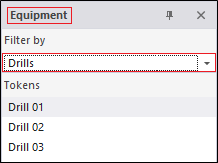
In the Data group | Equipment pane, for example, the following drills are listed when we filter on Drills
-
We can right-click and enter the following definition for PDrill2
| Option | Select |
|---|---|
|
Set Primary Status |
Operating |
|
Allocate to Location |
UGLocA One of the members of the UG Prod Locations active list selected when defining the equipment measures status change in Part i. |
PDrill2 is Operating at one of the UG Loading Locations.
-
We can then right-click and enter the following definitions for PDrill1
| Option | Select |
|---|---|
| Set Primary Status | Drilling |
| Allocate to Location | UGLocB |
PDrill1 is Drilling at another of the UG Loading Locations.
-
We can also right-click on PDrill2 and select Enter Measure to enter the following measure:
| Option | Select |
|---|---|
| Production Metres 70mm | 15 |
-
When we click OK to save the measure we receive the following message:
Measure 'Production Meters 70mm' is entered against equipment PDrill2. Do you wish to change the current equipment status 'Operating' for PDrill2 to 'Tramming'?
Total 'Production Meters 70mm' recorded against PDrill2 for the current status: 15 (Historic data not included).
When the drill measure was called it may have been an intermediate measure. Because the status change was defined as Automatic - Prompt the Control Room Operator is able to reject the status change and, at the same time, enter the measure into the database.
The system will accumulate all measures that occur during the shift, provided that the status of the unit is continuous (Operating, in this case) and provided that Data Acquisition has been set up to access the Reporting database (so that events prior to the start of the current shift can be included).
| Night Shift | Day Shift | ||||
| Status: | Operating | Tramming | |||
| Measure: | 3m | 5m | 4m | 5m | |
| Cumulative Measure: | 17m | ||||
The message shown above refers to 'historic data'. This indicates either that Data Acquisition has not been connected to the Pitram Portal, or that primary status of the unit of equipment has been changed since the start of the shift.
In response to the message prompt:
- Since we want PDrill2 to be allocated to Tramming, we click Yes. .
- If we then right-click on PDrill2 and select Set Primary Status, we will see that the status is set to Operating Time | Tramming. The status of PDrill2 has been automatically changed.
- We then right-click on PDrill1 and select Enter Measure to enter the following measure:
- When we click OK to save the measure, we receive the following message:
Measure 'Production Meters 70mm' is entered against equipment PDrill1. Do you wish to change the current equipment status 'Drilling for PDrill1 to 'Tramming'?
Total 'Production Meters 70mm' recorded against PDrill1 for the current status: 10
There is no reference to historic data in this message. This is because the status for PDrill1 was changed at the start of the shift, therefore no attempt has been made to accumulate the measures.
- In response to the message prompt, this time we click No. It is an intermediate measure. We want to save the measure, but we do not want to change the status.
- Some time later PDrill1 calls to say that 8m have been completed.
- We right-click on PDrill1 and select Enter Measure to enter the following measure:
- When we click OK to save the measure we receive the following message:
-
Measure 'Production Meters 70mm' is entered against equipment PDrill1. Do you wish to change the current equipment status 'Drilling for PDrill1 to 'Tramming'?
Total 'Production Meters 70mm' recorded against PDrill1 for the current status: 18
We have cumulated the measures and now have a total of 18 metres The Drilling status was maintained for the period when we entered 10, through till we entered 8.
- This time we respond with Yes.
- If we right-click on PDrill1 and select Set Primary Status, we will see that the status is set to Operating Time | Tramming. The status of PDrill1 has been automatically changed.
| Option | Select |
|---|---|
| Production Metres 70mm | 10 |
| Option | Select |
|---|---|
| Production Metres 70mm | 8 |
In the above example, we have set an automatic status change when a unit of equipment calls a final measure.