

EntryOfMeasureAgainstEquipLR
Automatic status change required:The production drill, when completed working on a face, calls in the total metres drilled measure. The location status is to change to: To Charge.
Reference data group: EntryOfMeasureAgainstEquipLR When a measure is entered against a unit of equipment at a location, the status of the location is changed.
Status Selection Mode: Automatic - Conditional Prompt
The active lists that you will be working with are:
| Active List | Members |
|---|---|
| Production Drill Equipment | PDrill1, PDrill2 |
| Production Drill Locations | UGLocA, UGLocB |
| PrimaryLocStates | Drilling, Firing, Blasting |
| SecondaryLocStates | To Bolt, To Charge, To Fire |
To define the EntryOfMeasureAgainstEquipLR in Reference Edit:
- Go to Groups | Configuration Items | States | Location Status Rules | EntryOfMeasureAgainstEquipLR on the navigation pane.
- Select Checkout on the header.
- Click New EntryOfMeasureAgainstEquipLR on the header.
- In the New Entry dialog, select the following definitions:
| Option | Select |
|---|---|
| General | |
| Code | PRODDRILLTOCHARGE |
| Description | Production Drill Measure: To Charge |
| Abbreviation | Production Drill Measure: To Charge |
| Attribute | |
| Equipment* |
Production Drill Equipment The unit of equipment must be a member of this active list. |
| Locations* |
Production Drill Locations The location of the drill must be a member of this active list. Parent location: If the measure is entered against a sublocation, the parent location of the set of sublocations to which the status change will apply, MUST be a member of the defined active list. |
| InitialLocStatusClassification* |
Primary One of the defined LocationStatusClassification states. It references the active list defined in InitialLocStates. |
| InitialLocStates* |
PrimaryLocStates The location must be in one of the states listed in this active list: Blasting, Bogging, Drilling and others. |
| MeasureCode* |
Metres 50mm The measure that will be accumulated if the status remains the same for the current period. The status must be a member of the PrimaryLocStates. |
| StatusSelectionMode* |
Automatic - Conditional Prompt Reference will be made to the attribute defined by LocationTargetAttribute. This attribute defines the target value of the measure for the location. In this definition the attribute is Planned Metres Drilled. |
| ManualSelectionStates* |
SecondaryLocStates If the StatusSelectionMode is manual, any of the states in this active list can be selected. The location can be changed to: To Bolt, To Bog, To Charge or another listed, for example. |
| AutomaticSelectionStatus* | To Charge |
| LocStatusClassification* |
Secondary One of the defined LocationStatusClassification. It references an active list which defines the status to which the location will be changed. |
| LocationTargetAttribute |
Planned Metres Drilled The location attribute that defines the drilling measure target. Used when the StatusSelectionMode is set to |
| Conditional %* |
90 If the metres cumulated for the location over the period in the current status are:
Where the target is defined in the Planned Metres Drilled attribute of the location. |
* Required attributes
- Click OK to save your settings.
- Click Checkin on the header.
- Click Publish on the navigation pane header.
- In the Publish dialog, click Publish. You will receive a message to say that publishing has been successful. Click OK to close the message.
Wait until the number of the reference edit group where you were working (EntryOfMeasureAgainstLocLR) updates to the latest version.
In Data Acquisition
- Make sure the latest reference data version number is reflected on the Status bar.
- In the Equipment tab of the Data Groups pane, set the filter to Production Drill Equipment and select PDrill1.
- Select the following options for PDrill1:
Option Select Allocate to Location UGLocA Set Primary Status Operating Time | Drilling - In the Locations pane of the Data Groups pane, Go to the set the filter to Production Drill Locations and select UGLocA.
- Select the following option for UGLocA:
Option Select Set Location Status Primary | Drilling - You are working with:
- A unit of equipment that is a member of the Production Drill Equipment active list.
- At a location that is a member of the Production Drill Locations.
- The location is currently in one of the PrimaryLocStates.
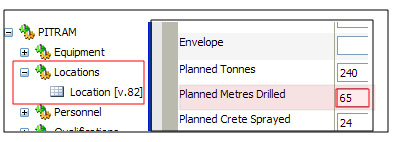
You have selected a conditional prompt mode for the status change selection. This means that the planned metres drilled by PDrill1 will be compared against the Conditional % of 90 that you defined. The planned targets for the location UGLocA are:
You now need to enter a measure against PDrill1 to trigger the status change to UGLocA.
- The PDrill1 operator has completed the drilling phase at this face, so go back to the Data Groups | Equipment pane and filter on Production Drill Equipment.
- Right-click on PDrill1 and select Enter Measure.
- Enter the following:
Option Value Metres 50mm 60
(The Planned Metres Drilled for UGLocA = 65. This means that more than 90% of the target has been achieved: you will receive a message prompt.) - Click OK to save the measure. You will receive the following message:
Measure 'Metres 50mm' is entered against equipment PDrill1. Do you wish to change the current location status 'Drilling' for UGLocA to 'To Charge'. Total 'Metres' 50mm recorded y PDrill1 against UGLocA for the current status: 60 [92.3%]
If the Conditional % = 90 and the accumulated value of the metres drilled at the location are between 90% and 100% of the Planned Metres Drilled for the location, you will receive a prompt to either accept or reject the location status change.
- Click Yes to accept the change.
- Go back to the Data | Groups | Locations pane, set the filter to Production Drill Locations and select UGLocA.
- Right-click and select Set Location Status | Secondary. The status has been changed to To Charge.