

Form Set Lock
To lock one or more form sets:
- Select Project | Project | Manage Form Sets.
In Vizex, you can also lock form sets in the Home | Forms | Form Set Manager.
- Select the form sets you want to lock. To select multiple form sets, use the CTRL or the SHIFT key with the mouse.
- Select the right-click Lock Form Set menu option to open the Form Set Lock dialog:
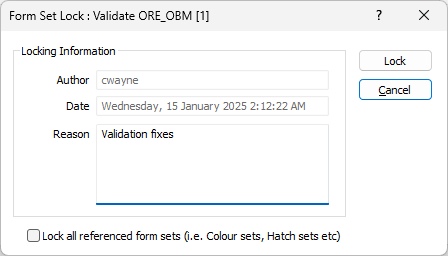
In the Form Set Lock form, you can indicate why other users are prevented from editing and saving the form set and also choose to apply the lock to all referenced form sets.
 When a formset is locked it is shown as locked (with a padlock icon) in the Forms selection list and in the Vizex Layer Types pane (if applicable).
Author
The user who has locked the form set. Non-editable.
Date
The date and time at which the form set was locked. Non-editable.
Reason
The Reason field should indicate why other users are prevented from editing and saving the form set.
Lock all referenced form sets
If this check box option is selected, all referenced form sets are also locked. A form set may contain embedded references to other form sets, including colour sets, hatch sets and symbol sets, etc. If a form set is referenced by other form sets its Title is shown in Italics.