

Material Bins
On the Material Bins tab of the Reference Block Model form, the Material Bins definition grid is used to define the material bins for schedule definition. Optionally, you can specify the material bins for which attributes are to be calculated using the Material Bin Set option. Material bin block classification evaluates the filters (or expressions) for each bin from the top-down until one evaluates to true.
The Materials Bin grid is also contained on the Block Model tab of Block Model and the Material Classification tab of the Pit Optimser.
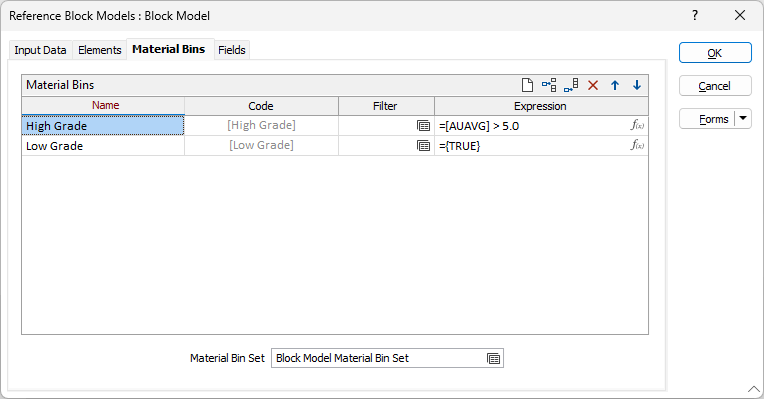
Use the icon buttons on the top right of the grid list to add, delete, order and clear items in the list.
Enter the following details for each material bin:
Name
Enter the name of the material bin for which the parameters are specified. This name is also used to build names for fields in report data sources and attributes for saved wireframes.
Code
Enter the identification code to be assigned to the material bin for which the parameters are specified. This code is used to identify the material bin within reports and for abbreviated labelling of related entities as required.
Filter
(Optional.) Specify the filter to be applied to the block model to identify the material to be included in the material bin. If not specified, no filter is applied, and material will be included if Expression returns a non-zero value.
Expression
(Optional.) Specify the expression to be evaluated to determine whether material should be included in the material bin. The expression must return a non-zero value if the material is to be included.
If both Filter and Expression are defined for the material bin, the filter will be applied to the block model values, and the expression will be applied to the filtered values.
If neither Filter nor Expression are specified, no material will be assigned to the material bin.
Material Bin Set
Optionally, specify the material bins for which attributes are to be calculated. Press F4 (or choose Edit from the right click menu) to open the Material Hierarchy window. For more information, see: Material Bin Set