

Create a cut-off set
To use a cut-off set - one you have already created:
- Select the Cut-off set option.
- Double-click (or click on the Select icon) in the Cut-off set response. A list of cut-off sets will appear.
- Select one from the list.
To create a new cut-off set:
- Double-click in the Cut-off set response and then select the Default set.
- Right-click in the Cut-off set response and select Edit (F4).
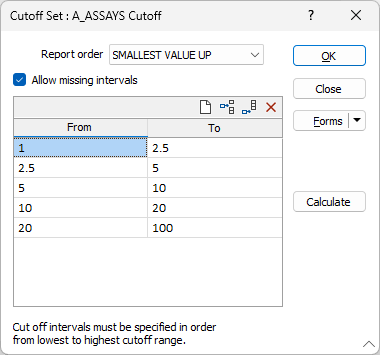
Set the following parameters in the Cut-off Set form:
Report order
Choose the report order. This controls the order in which values will be reported and what happens to border values.
- SMALLEST VALUE UP - a value will be assigned to the interval with the lower interval range first.
- LARGEST VALUE DOWN - A value will be assigned to the interval with the higher interval range first.
The LARGEST VALUE DOWN and SMALLEST VALUE UP options control what happens when a value occurs right on the boundary of two intervals. The table below illustrates which interval an example value of 1.50 will fall in according to your setting for Report order:
| Cut-off Intervals | Largest Value Down | Smallest Value Up |
|---|---|---|
| 0.5 to 1.5 | ü | |
| 1.5 to 5.0 | ü | |
| 5.0+ |
The ranges you define for the cut-off set cannot overlap. Cut-off intervals must be specified in order, from lowest to highest cut-off range.
Allow missing Intervals
Select this option to manually enter (or edit the calculated) From-To interval ranges to allow for missing (non-continuous) intervals. If this option is not selected, it is assumed that the intervals are continuous and you can only enter a start (From) value and the upper (To) ranges of each interval.
Calculate
Click this button to automatically calculate ranges based on first and last values (you enter) and either a set number of intervals or a set interval size.
Variable Inspector
To compare and visually validate the variograms generated from an MIK (Multiple Indicator Kriging) Cut-off Set, use the Variogram Inspector.
Forms
Click the Forms button to select and open a saved form set, or if a form set has been loaded, save the current form set.
OK
Click the OK button to apply the cut-off set and return to the main form.