

File to Grid

Input
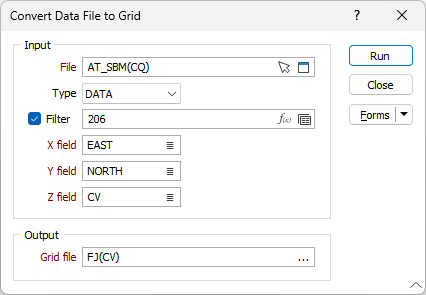
In the Micromine File to Grid form, select a Micromine (DATA, SURVEY, STRING, REPORT) file type and then double-click to select the name of the input file. You can also click the Pick from Vizex button to collapse the form and interactively select a layer containing the file to be inserted and return to the form.
Optionally, select or create a filter to limit the data that is processed.
If you select the Filter check box, you can select an existing filter or create one using the Expression Editor by clicking the icon.
Double-click in the field boxes to specify the fields in the file that contain X Y Z coordinates.
Output
Grid file
Enter or double-click to select the name of the output Micromine Grid Surface (*.GRD) file.
Forms
Click the Forms button to select and open a saved form set, or if a form set has been loaded, save the current form set.
Run
Finally, click the Run button to begin the conversion process.