

To Block Model
The Volume File to Block Model option is also available on the the Block Model tab, in the Convert group.

Input
File
Double click (or click on the Select icon) to select the volume File you want to convert to a block model.
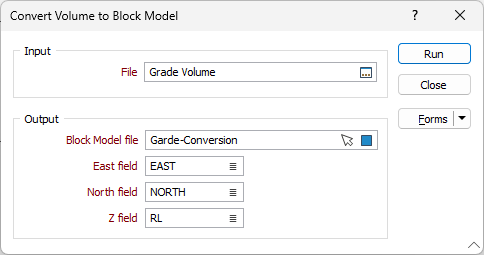
Output
Block Model file
Double-click (or click on the Select icon) to select the name of the output Block Model (*.DAT) file. You can also click the Pick from Vizex button to collapse the form and interactively select a layer containing the file to be inserted and return to the form.
Easting, Northing and Z fields
Specify Easting, Northing and Z coordinate fields for each file.
To view the output from this function:
- On the Home tab or the Vizex tab, in the Layer group, select Display Layers > Block Model.
Run
Finally, click the Run button to run the Conversion using the parameters you have defined.