

Trench Validation
Before using drillhole functions you should validate your trench data. If you do not validate your trench data, the drillhole functions will generate error messages whenever inconsistencies are found.

What Trench Validation checks for
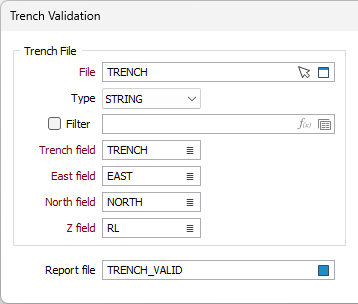
Trench File
File
Double-click (or click on the Select icon) to select the names of the file containing your data. You can also click the Pick from Vizex button to collapse the form and interactively select a layer containing the file to be inserted and return to the form.
Optionally, select or create a filter to limit the data that is processed.
If you select the Filter check box, you can select an existing filter or create one using the Expression Editor by clicking the icon.
Type
Select the file type for the trench file from the drop down.
Filter
You can select this check box and specify a filter to limit the data from the trench file that will be considered in the validation.
Trench field
Specify the name of the field that identifies each trench in the file.
East and North and Z fields
Specify the names of the fields containing Easting, Northing, and Z coordinates in the file.
Report file
Optionally specify the name of a Report file. Error messages generated during the validation process are written to this file. Read this file for details on any errors.
Trench Assays and Events
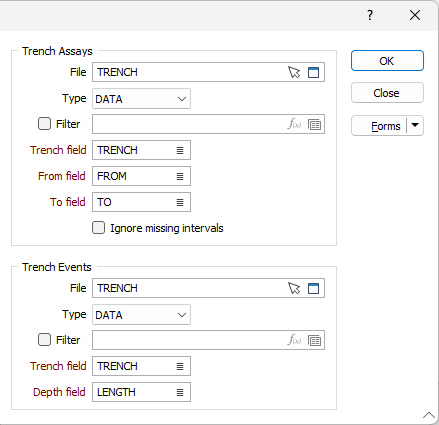
File
Double-click (or click on the Select icon) to select the names of the Assay and Event data files containing your data. You can also click the Pick from Vizex button to collapse the form and interactively select a layer containing the file to be inserted and return to the form.
Optionally, select or create a filter to limit the data that is processed.
Type
Select the file type for the Assay and Events files from the drop down.
Filter
You can select this check box and specify a filter to limit the data from the Assay or Event file that will be considered in the validation.
Trench fields
Specify the names of the fields that identify each trench in the Assay and Event files.
From and To fields
Specify the names of the From and To fields in the Assay file. The To value is always greater than the From value and the difference between them (To - From) is the length (or thickness) of the interval.
Run
Click Run and a series of status messages will appear as the Validation process validates the trench files. If an error is detected, an appropriate message will be displayed.
After the run is complete, correct any errors and re–run Validate. Continue this process until your trench data is error free.
Correcting one error may lead to the detection of another.
Forms
Click the Forms button to select and open a saved form set, or if a form set has been loaded, save the current form set.