

Significant Intersections

To show grade continuity within the data, it is normal to accumulate contiguous significant intersections into one long interval using a length-weighted average. If the long interval includes an intersection with an exceptionally high grade (or metal value), the exceptional grade is highlighted by appending it to its "parent" intersection. For example:
UMC-035, 13.00 m @ 2.69 ppm Au and 42.51 ppm Ag from 120.00 m, including 1 m @ 13.87 ppm Au and 144.00 ppm Ag from 121.00 m
A simple example of how expressions can be formulated and concatenated is shown in the help topic for the Output tab of the form.
Input
Interval file
Double-click to select the Assay file (typically) that contains the interval data you wish to report on.
You can also click the Pick from Vizex button to collapse the form and interactively select a layer containing the file to be inserted and return to the form.
Optionally, select or create a filter to limit the data that is processed.
If you select the Filter check box, you can select an existing filter or create one using the Expression Editor by clicking the icon.
A filter can be useful when you want to apply a restriction on a field other than the element field(s), for example, to show the assays in a particular zone, or the assays for specific holes.
Hole ID field
Double-click (or click on the Select icon) to select the name of the field that identifies each hole in the file.
From and To fields
Double-click (or click on the Select icon) to select the name of the From and To fields. The From and To fields are used to define the location, and length, of an interval in a drillhole or trench. The From field contains the downhole depth (distance along the trace) from the hole collar to the start of an interval. The To field contains the downhole depth from the hole collar to the end of the interval. The To value is always greater than the From value and the difference between them (To - From) is the length (or thickness) of the interval.
Cut-off grade threshold
Specify the cut-off grade threshold. This value determines which intervals are included in the calculation.
Significant grade threshold
Specify the significant cut-off grade threshold. This value determines which intervals are used for the exceptional grades.
A specified grade cut-off of 2 ppm, and a specified significant grade threshold of 10 ppm, for example, might be specified on the Input tab of the form:
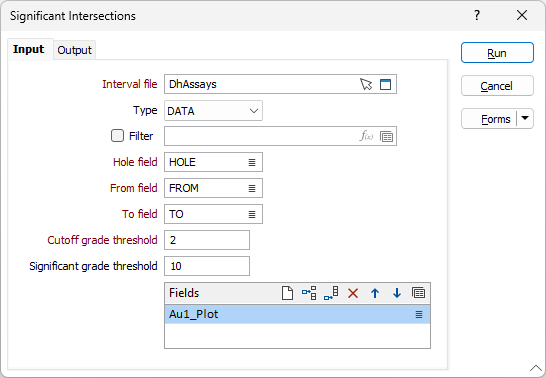
Element Fields
Select the Element Fields you want to report on. Use the buttons on the local toolbar to Manage the rows in the list.