Rendering
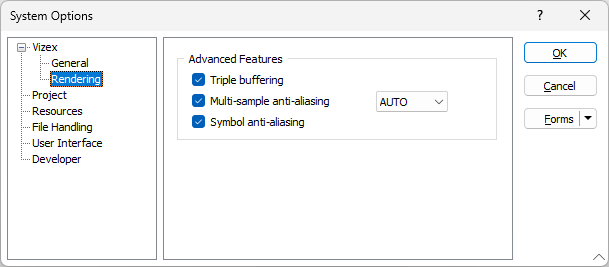
In the Options | System | System Options form, on the Vizex > Rendering tab, configure the OpenGL and Advanced Features rendering options for Vizex, system-wide.
Advanced Rendering Features
Triple buffering
Enabled triple buffering ensures optimal performance when numerous large datasets are loaded in Vizex.
'Buffering' relates to the graphics card. Modern graphics cards have a Primary Buffer, a Secondary Buffer, and if enabled, a Tertiary Buffer, which are storage areas on the Video RAM of the card. The process of using three buffers at one time is called Triple Buffering.
Since Triple Buffering uses additional Video RAM, it can result in problems for those with less VRAM onboard their graphics card.
Multi-sample anti-aliasing
Use the options in the Multi-sample anti-aliasing drop-down selection box, to select the multi-sampling rate to apply when rendering Vizex objects. A higher multi-sampling rate will result in smoother (less jagged) edges for lines, wireframes, simple points (circles), annotation arrow heads, and dashed lines.
The default multi-sampling rate is x8. The rate you can select will typically be between 2 and 32, however the maximum that you can select may be limited by your graphics card.
Changes to the multi-sampling rate will not be applied to windows that were opened prior to the change, but will be applied if you subsequently open a new window or restart the application.
Symbol anti-aliasing
When points are displayed as symbols in Vizex, to smooth the symbols to produce perfectly round edges, anti-aliasing is turned on by default.
Note: Dense point cloud layers may appear "noisy" due to the anti-aliased edges of points. An Anti-aliasing setting can be turned off individually for those layers when you load them in Vizex.