

Set Active Layer
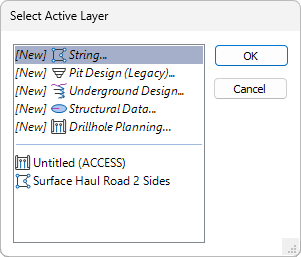
In the Vizex Layer Display pane, from the toolbar, click Set Active Layer to select a layer as the active layer. You can also right-click on a layer in the Vizex Layer Display pane, to set that layer as the active layer.

New Active Layer
Alternatively, select a [New] option from the Active layer drop-down menu in the Vizex Layer Display pane, to create a layer of the chosen type and make that layer the active layer:
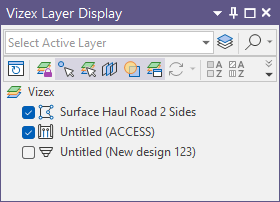
The same options are available on the Home and Vizex ribbons from the Layer group.
'Active' layer versus 'Current' layer
It is important to differentiate between a layer that is 'active' and a layer that is 'current'. The current layer is sometimes referred to as the 'right-click' layer. In other words, it is the layer currently selected in the Vizex Layer Display pane (see below).
The active Layer and the current layer need not be the same.
The name of the active layer is visible on the Vizex Layer Display pane. When an active layer has been selected, it is also highlighted in the pane.
The content of the current layer can be edited without specifically selecting that layer as the active layer. For example, you can copy, move, smooth or simplify strings that are not in the active layer. You can also open a file associated with the current layer, by selecting a display object in the layer and then selecting Open Input File from the right-click menu.
However, to interactively add data to any editable object, you must first make it the active layer.
If an "Edit Lock" has been applied to prevent inadvertent editing of the layer, and you select that layer as the active layer, it is unlocked and becomes editable.
You may be prompted to select the active layer when you select an interactive tool on the Strings tab or the Wireframe tab, etc.
Alternatively, you can right-click in the Vizex display and select Active Layer to set the current layer as the active layer. If the current (right-click) layer is already the active layer, selecting this option will toggle the active layer off.
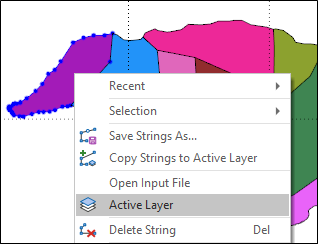
The right-click Active Layer option is only available when an editable object is selected in the current layer.