

Intersect Seam Block Model with Solid
- Trim a seam block model to a solid, or
- Split the blocks that intersect the solid and write codes to a specified field that identifies whether those blocks lie inside or outside the solid.

Input
Seam Block Model file
Double-click (F3) to select the Seam Block Model (SBM) file that will be used as input to the process. You can also click the Pick from Vizex button to collapse the form and interactively select a layer containing the file to be inserted and return to the form.
Seam block models use variable-height blocks, which are not limited to a set sub-blocking interval. Seam splits, plies and partings are easily defined.
Optionally, select or create a filter to limit the data that is processed.
East, North, Z fields
Double-click (F3) to select the coordinate fields in the input file.
Solid
Specify the Type and Name of the input wireframe. You can also use the Pick from Vizex button (or select the context menu option where available) to collapse the form and interactively select the required Wireframe to insert and return to the form.
Solid Intersection
The SBM file is modified in one of two ways. The options on the Trim and the Split tabs of the form will be enabled depending on the option you select here:
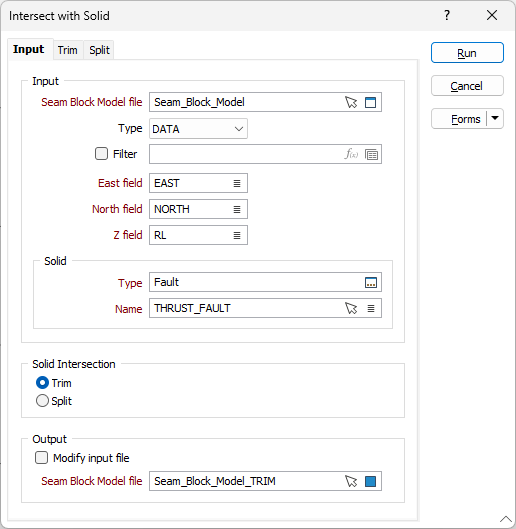
Output
The results of the process can be written to the same Input file or to a separate Output file.
Modify Input file
If this option is selected, the results of the process will be written to the input Seam Block Model file.
Seam Block Model file
If you have chosen not to modify the Input file, double-click (F3) to select the name of an output Seam Block Model file. You can also click the Pick from Vizex button to collapse the form and interactively select a layer containing the file to be inserted and return to the form. The trimmed or split blocks will be written to this file.
Forms
Click the Forms button to select and open a saved form set, or if a form set has been loaded, save the current form set.
Run
Finally, click Run to begin the process.