

Functions as Parameters
Parameters that can be expressed as a variable have an extra input field (immediately to the right of the normal input field) which is marked with a symbol  .
.
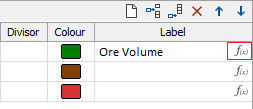
Double-clicking in this input field opens a link to a form that can be used to define the expressions that will be used for the parameter.
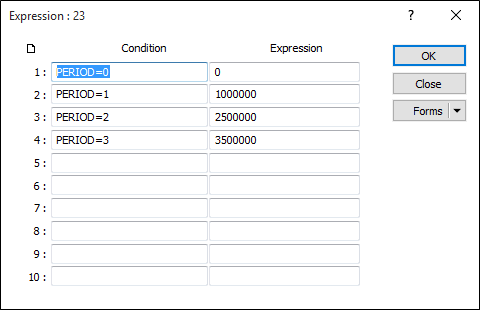
The logic behind the form is as follows:
- The process evaluates the expressions in the 'Condition' column, starting from the top and looking for the first TRUE condition.
- If a condition is TRUE, then the corresponding expression is evaluated and its result is assigned to the parameter.
- If all conditions are FALSE, then the value entered in the form (if any) is used as the parameter instead.
Writing expressions
Variables, constants, arithmetic operators and logical operators can be included in an expression. The operators used in an expression are evaluated in the following order of precedence:
- Operations inside brackets,
- then power,
- then multiplication/division,
- then addition/subtraction.
Constants
Constants can be numeric or character:
- 123.4567 – numeric constant;
- “This is a string” - character constant.
Type conversions
| Type | Numeric | String | Boolean |
|---|---|---|---|
| Numeric | - | String containing the numeric value, i.e. “5” for 5 | TRUE, if not zero. FALSE, if zero. |
| String | If possible, numeric value from the string. 0 otherwise. | - | TRUE, if not empty or not “false”. FALSE, if “false” or empty. |
| Boolean | 1, if TRUE. 0, if FALSE. | “true” if TRUE. “false” if FALSE. | - |
Arithmetic operators
| Operator | Effect for numbers | Effect for strings | Effect for Boolean |
|---|---|---|---|
| + | Addition | Concatenation |
Logical OR |
| - | Substraction | Invalid operation |
Logical OR inverted |
| * | Multiplication | Invalid operation |
Logical AND |
| / | Division | Invalid operation |
Logical AND inverted |
| ^ | Power | *1 | * |
Unless otherwise stated, the type of the right expression will be converted to the type of the left expression before executing the operation.
i.e. "5.05" will be the (concatenated) result of “5.0” + 5, and 10 will be the (arithmetic) result of 5.0 + “5”.
Comparison operators
| Sign | Operator |
|---|---|
| > | Greater than |
| < | Less than |
| >= | Greater or equal |
| < | Less or equal |
| = | Equal |
| != | Not equal |
If the types of the left and right expressions are different, the right expression will be converted to the type of left expression before making the comparison. Comparison operations produce a Boolean result.
Logical operators
| Sign | Operator |
|---|---|
| & | Logical AND |
| | | Logical OR |
| ! | Logical NOT |
Conditional operators
The expression parser has a conditional operator 'if'. It has the following syntax:
| if <conditional expression> then <expression_true> else <expression_false> fi |
Unlike most programming languages, the expression parser treats the 'if' operator as one that must have a result, therefore all parts of the operator are compulsory.
The <conditional expression> gets evaluated first. This evaluation uses standard typing rules, and the result is then converted to Boolean.
If the expression evaluates to TRUE, then <expression_true> is evaluated. Otherwise, <expression_false> is evaluated.
The result type and value of the 'if' operator is the type of either <expression_true> or <expression_false>.
The last 'if' token – it marks the end of the 'if' operator.
You can use the 'if' operator in the following way:
| MCAF + if RECOVERY > 0.5 then MCAF * 2 else 0 fi |
In other words, if the RECOVERY is greater than 0.5, then add MCAF * 2 to MCAF, otherwise add 0 (nothing).
Variables
In the case of Pit Optimisation, the following variables are defined:
| Variable | Value |
|---|---|
| TRUE | Logical TRUE |
| FALSE | Logical FALSE |
| ALWAYS | Logical TRUE |
| COORD_X | X coordinate of currently processing block |
| COORD_Y | Y coordinate of currently processing block |
| COORD_Z | Z coordinate of currently processing block |
| <FIELD NAME> | The value of the record's field. |
Functions
The general form of calling a function is:
| FUNCTION (<param1>, <param2>, ... <paramN>) |
Currently defined functions are:
| Function | Description |
|---|---|
| DEFINED(x) | X – variable. Check if it is defined (was assigned any value). |
| SIN(x) | Sine. X is expected to be in degrees |
| COS(x) | Cosine. X is expected to be in degrees |
| TAN(x) | Tangent. X is expected to be in degrees |
| ASIN(x) | Arcsine. Returns value in degrees. |
| ACOS(x) | Arccosine. Returns value in degrees. |
| ATAN(x) | Arctangent. Returns value in degrees. |
| LN(x) | Natural logarithm. |
| LG(x) | Base-10 logarithm |
Tips:
- Be aware of the type conversion in your expression. Remember that apart from a few exceptions, the type of the result is the type of the leftmost operand. Note therefore, that “5” + 5 equals “55” and not 10.
- Remember that the variable type is the type of the corresponding file field.
- Function and variable names referred to in the expression are matched only when they are actually needed to produce a value. Use the DEFINED function to ensure that a variable exists and has a value before referring to it. 2 + MCAF is unsafe, since MCAF might not exist or might not have a value.
Use 2 + if DEFINED (MCAF) then MCAF else <some_defined_value> fi instead.
- Use parentheses to ensure that the computation order is correct.
- Remember that ALL parts of the 'if' operator are compulsory. Don't forget the 'fi' to mark the end of your conditional operator.